Generate images
by the batch.

Write one instruction and the Lab turns it into a batch of distinct prompts, or paste your own. Add a reference photo to keep a product or character consistent, run several image models on the same prompts, and star the images worth keeping.

One product photo, eight scenes.

One batch: a reference photo of a mug and a single instruction. Prompt expansion wrote eight prompts, and the mug kept its glaze, base and handle in every image.

  • The reference mug: kitchen island, early morning
    Kitchen island, early morning
  • The reference mug: cafe table, late morning
    Cafe table, late morning
  • The reference mug: home office, midday
    Home office, midday
  • The reference mug: bedside, blue hour
    Bedside, blue hour
  • The reference mug: breakfast table, weekend
    Breakfast table, weekend
  • The reference mug: balcony, overcast afternoon
    Balcony, overcast afternoon
  • The reference mug: garden table, golden hour
    Garden table, golden hour
  • The reference mug: woodland bench, misty morning
    Woodland bench, misty morning
Read the eight prompts the Lab wrote
  1. Exact reference mug on a pale oak kitchen island beside a linen tea towel and a small bowl of citrus, soft early morning window light, natural lived-in styling, 50mm lens, no text or logos.
  2. Exact reference mug on a dark cafe table beside an open pastry plate and folded newspaper turned away from camera, warm late-morning sunlight, intimate urban cafe atmosphere, 50mm lens, no text or logos.
  3. Exact reference mug beside a laptop and handwritten notebook on a calm home-office desk, diffused midday light through blinds, understated natural styling, 50mm lens, no text or logos.
  4. Exact reference mug on a bedside table beside a book and a small vase of seasonal branches, gentle blue-hour light from the window, quiet evening mood, 50mm lens, no text or logos.
  5. Exact reference mug on a rustic breakfast table with toast, butter and a small dish of berries, bright weekend morning sunlight, natural shadows, 50mm lens, no text or logos.
  6. Exact reference mug on a covered balcony table beside a wool throw and a potted herb, soft overcast afternoon light, relaxed outdoor setting, 50mm lens, no text or logos.
  7. Exact reference mug on a garden table beside a plate of cake and scattered wildflowers, warm golden-hour sunlight, softly blurred greenery beyond, 50mm lens, no text or logos.
  8. Exact reference mug on a wooden bench beside a folded scarf and an open sketchbook, cool misty morning in a quiet woodland clearing, natural atmospheric light, 50mm lens, no text or logos.

Same prompt, five models.

Pick more than one model and each runs the same prompts in the same batch. These came back together, one image per model, and are shown as generated.

  • A heating engineer in his van at night, generated by GPT Image 2.5 Sunburst
    GPT Image 2.5 Sunburst
  • A heating engineer in his van at night, generated by GPT Image 2.5 Flare
    GPT Image 2.5 Flare
  • A heating engineer in his van at night, generated by Seedream 4.5
    Seedream 4.5
  • A heating engineer in his van at night, generated by Gemini 3 Pro Image (Nano Banana Pro)
    Gemini 3 Pro Image (Nano Banana Pro)
  • A heating engineer in his van at night, generated by Gemini 3.1 Flash Image (Nano Banana 2)
    Gemini 3.1 Flash Image (Nano Banana 2)

Prompt

A heating engineer in his forties sitting in the driver's seat of his van at night, seen side-on from the passenger seat, phone light on his face, paperwork on the dashboard, face small in frame. Documentary photograph of a real UK small business, natural light, 35mm lens, shallow depth of field, ordinary work clothes, realistic hands. Nobody looks at the camera; faces are side-on, turned away or small in the frame. No text, lettering, logos, signage or readable screens.

Models in the Lab today

  • Nano Banana 2.1
  • Seedream 5.0 Pro
  • Seedream 5.0 Lite
  • Gemini 3.1 Flash Image (Nano Banana 2)
  • GPT Image 2.6 Sunburst
  • GPT Image 2.6 Flare
  • GPT Image 2.5 Flare
  • GPT Image 2.5 Sunburst
  • GPT Image 2
  • Gemini 3 Pro Image (Nano Banana Pro)
  • Gemini 2.5 Flash Image (Nano Banana)
  • Seedream 4.5
  • Kling Image V3
  • Kling Image O3
  • Grok Imagine Image
  • GPT Image 1.5

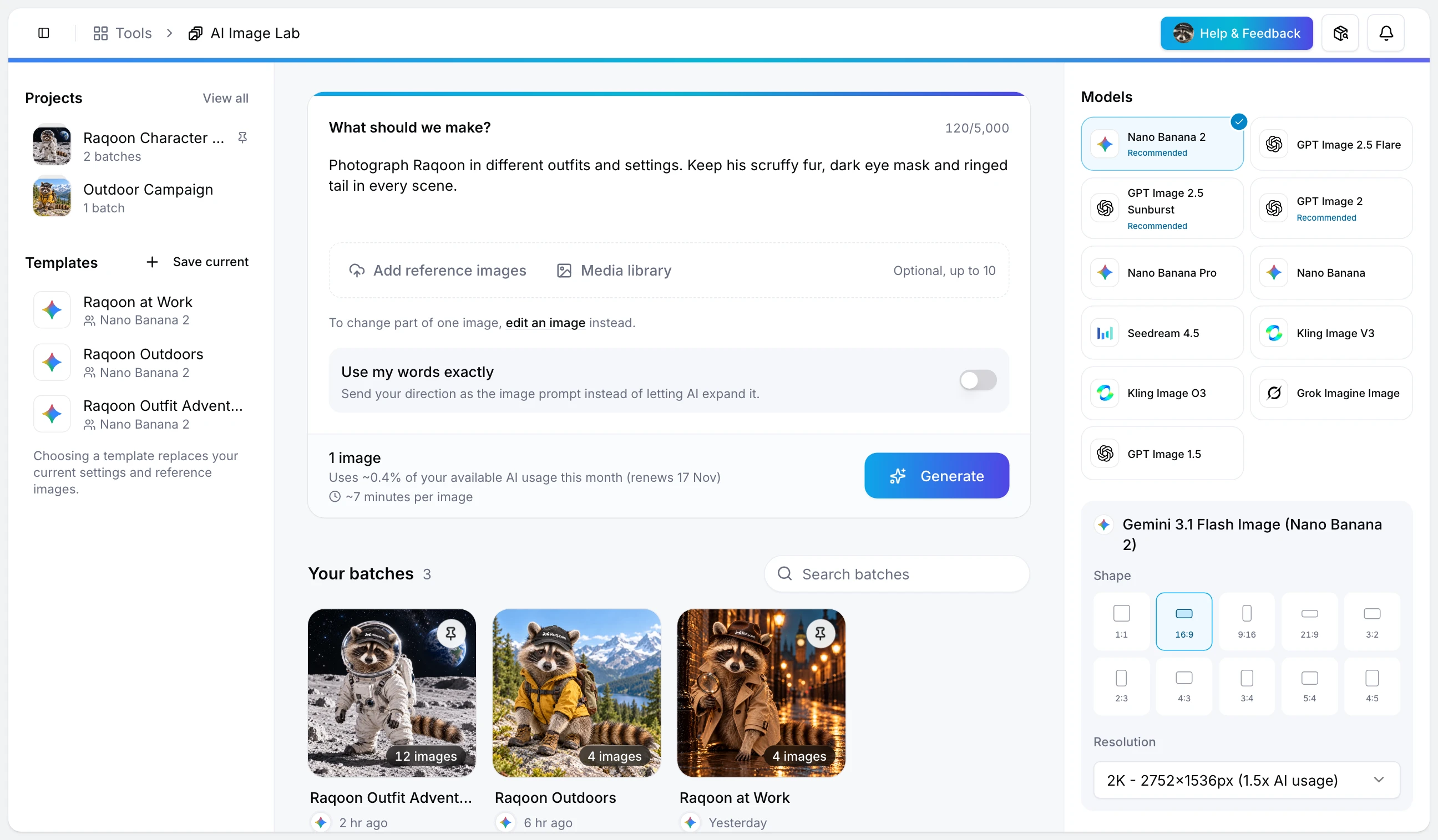
Prompts on the left, results on the right.

Each batch keeps its instruction, prompts, settings and images together, so you can come back to it, star the best and generate more.

AI Image Lab workspace

From one instruction to a finished set.

Describe

Write one instruction, or paste the exact prompts you want.

Prompt expansion writes up to 50 variations from one instruction, and you can edit them before anything runs. Add reference photos when the batch has to match a product, a face or a style.

Generate

Pick one model or several, then the aspect ratio and size.

Each prompt can run up to ten times, and every model you pick runs the same prompts, so the results compare like for like.

Keep

Star the best images and build on them.

Generate more from a prompt that works, start a new batch from any image, or download the whole batch as a ZIP.

What a batch can do.

Prompt expansion

One instruction becomes a batch of distinct prompts. Review and edit them before you generate, or skip expansion and write your own.

Reference images

Add up to ten photos to keep a product, a person or a look consistent across every image in the batch.

Several models at once

Run the same prompts through more than one model, each with its own aspect ratio and size, and compare the results side by side.

Star and branch

Star the keepers, generate more from them, or open any image as the starting point for a new batch.

Edit part of an image

Paint over the area you want to change and describe the fix. The rest of the image stays as it was.

Templates and ZIP export

Save an instruction, model and reference photos as a template for the next run, and download any batch as a ZIP.

Room for a whole shoot in one batch.

100

Images in one batch

50

Prompt variations from one instruction

10

Reference images per batch

Start with one instruction and a reference photo.

Open the Lab, describe the set you need and let it write the prompts. Star what works, generate more from it and download the batch when it is ready.

How signing up works

  • AI Image Lab runs on Raq.com. Create a Raq.com account and the Lab opens straight in your workspace.
  • The free trial lets you try every AI tool once. Here that means one batch of up to 4 images. No card required.
  • After that, images use your plan's monthly AI allowance. Plans start at £29 a month.